
Know which Apple Ads keywords to pause, tune, and test.
One focused report on your campaigns, with actions specific enough to apply the same afternoon. Pay per report. No subscription.
A slice of an AdCider report for Lumen, an AI background remover. Section 01 (Pause) recommends pausing the keyword “background eraser” (saving $487/month) and adding eight exact-match negative keywords (saving $312/month). Five sections are omitted in the middle. Section 07 (Competitor insights) shows likes, dislikes, and wants pulled from PhotoRoom’s App Store reviews. Click for the full sample report.
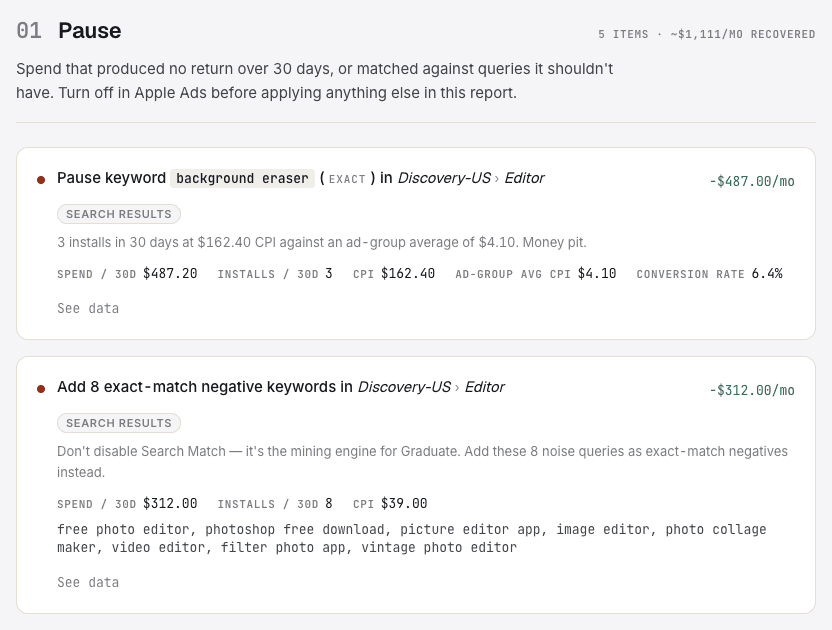
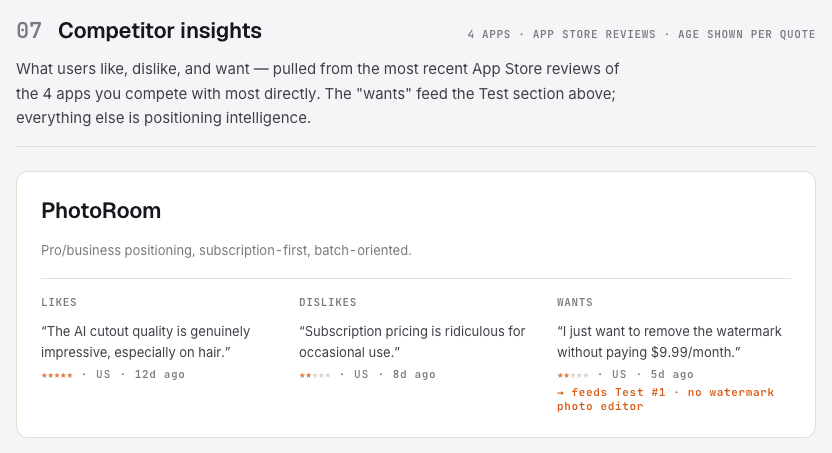
Slice of the full report
Setting up Apple Ads is the easy part.
The hard part is every Monday after. Spend creeps up, installs don’t, and the dashboard hands you rows of numbers with no opinion about any of them. So you sort by spend, stare, nudge one bid, and close the tab.
What you get
A focused report. Six possible sections.
Each section ends with concrete actions you can take in the Apple Ads UI: the keyword, the ad group, the new bid or status.
Pause
Keywords to pause
The keywords quietly draining your budget, and the math for when one has had enough taps to be judged fairly.
DecisionWhich keywords to set as paused or negatives, on which campaign.
Tune
Keywords to tune
Bid adjustments for keywords where what you actually pay per install has drifted from what you planned to pay.
DecisionThe new bid amount, on which keyword, in which ad group.
When the data supports it, also covered
Graduate
Keywords to graduate
Search Match discoveries ready to promote to exact match in a dedicated ad group.
Restructure
Campaign restructure
When your ad-group or campaign layout is fighting your strategy: naming collisions, internal match-type competition, brand on broad.
Test
New keywords to test
Drawn from your own account and from what people actually write in your competitors' App Store reviews. Each comes with a bid floor and a kill rule.
Context
Competitor reviews
Themed quotes from your competitors' App Store reviews: the source material behind every Test recommendation.
Not every report includes every section. You only get the recommendations your data actually supports.
How it works
From login to delivered report in minutes.
Connect your Apple Ads account(s)
Link as many as you want. Solo dev, growth team, or agency with a dozen client accounts: one login, every Apple Ads org in one place.
Select your app and group campaigns
Choose which campaigns to analyse together as one coherent strategy: same storefront, same intent.
Confirm competitors
We suggest a starting list from your account and the App Store. Add or remove whoever you actually compete with.
Pay and generate
Tier is auto-detected from your selected spend. Report ready in a few minutes. We email you when it lands.
Reports stay in your account forever. Download as PDF or revisit anytime.
Pricing
Pay per report. No subscription.
Your report: $59 · follow-up within 30 days: $30
| 30-day spend | First report | Follow-up within 30 days |
|---|---|---|
| Under $500/mo | $29 | $15 |
| $500–$2.5k/mo | $59 | $30 |
| $2.5k–$10k/mo | $129 | $65 |
| $10k–$30k/mo | $249 | $125 |
| $30k+/mo | $449 | $225 |
7-day refund. No forms, no questions.
Half price within 30 days. Another report on the same app while the data still overlaps costs half. It opens with what changed since last time.
Tier is set by the 30-day spend on the campaigns you select for the report, not your entire Apple Ads account. You see the numbers on the data-check screen and the exact price before you pay.
Why this exists
AdCider is small on purpose.
There’s no dashboard to check, no seats, no subscription quietly renewing while you’re busy shipping. You buy a report when you want one, read it, apply what makes sense, and get back to work.
That shape keeps the incentives honest. A subscription has to keep you looking at it. A report you paid for once has to be worth it, every single time. I’d rather build under the second kind of pressure.
If a report misses for you, the refund above is real. And if you read one and disagree with a recommendation, I want to hear why: hi@adcider.com.

Nick NankovMaker of AdCider
FAQ
Why not just export my data and ask ChatGPT?
You can, and it's genuinely useful. The differences are what goes in and what gets checked. A report here runs on your full 30-day account structure plus your competitors' App Store reviews, which never appear in your own export. Then the work is checked twice: the analysis is audited by a separate model that only looks for Apple Ads mistakes, and every recommendation is verified in code against your actual account. The keyword exists, the quote is verbatim, the negative won't block your own exact match. In a chat, one model checks its own work, and the rest of the checking is your job.
What if the report isn't useful?
Email us within 7 days and we'll refund you. No forms, no questions. One exception: if your campaigns have too little data for reliable analysis, we flag that before payment. You can still proceed, but refunds won't apply in that case.
What if my campaigns are new or have very little data?
We'll warn you before payment. You can still proceed if you want, but the report will run thin and won't be covered by the refund policy.
I've run Apple Ads for years. Will this tell me anything I don't know?
Treat it as a second set of eyes rather than instructions. It does the full sweep you rarely have time for: every keyword against the same thresholds, every search term, plus your competitors' reviews. Every recommendation shows its supporting data, so checking a call you doubt takes a minute, not another export. You'll probably disagree with a few of them. That's fine. The receipts are as much the product as the opinions are.
Can I link more than one Apple Ads account?
Yes. Unlimited accounts under one login.
Where do my past reports live?
In your account, always accessible. Downloadable as PDF.
What data window does the report use?
The last 30 days of campaign data.
What if I want another report soon after?
A report on the same app within 30 days of your last one is half price. The data windows overlap, so the second report contains less new analysis, and the price says so. Follow-up reports open with a summary of what changed: which recommendations cleared, which persist, and what's new.
How long does generation take?
A few minutes. You'll get an email when it's ready.
Do you apply changes to my campaigns automatically?
No. You apply recommendations manually. Every suggestion includes the reasoning and the supporting data, so you can decide.
Is my Apple Ads data secure?
Yes. We request a read-only OAuth scope — AdCider can never modify, pause, or budget your campaigns. Tokens are encrypted at rest. Your campaign data is not shared with third parties and is not used to train models.